Start here
Getting Started
Copilot works best when your account, preparation materials, and Mac permissions are ready before the call.
- Create an account. Your plan, interview history, and reports are connected to your account.
- Download the desktop app. The current app requires macOS 26 or later. Windows support is not available yet.
- Complete Candidate Memory. Add a Target Role and, when useful, a resume and supporting context.
- Set up and allow the required permissions. Copilot needs Microphone and Screen & System Audio Recording access for the relevant features. macOS may also request Speech Recognition access. Camera access is optional.
- Choose a practice or live workflow. Use Mock Interview to rehearse, or launch Copilot for a real interview.
Before the real callRun a short test so you know captions can hear both you and the interviewer.
Candidate Memory
Candidate Memory
Give Copilot only the context relevant to the role you are interviewing for.
Resume
Upload and save a PDF, DOC, or DOCX resume up to 5 MB, then select it in Launch Copilot. Mock Interview requires a resume.
Target Role
Save the company, role, and job description to give Copilot relevant background for the position. Mock Interview requires a Target Role.
Extra Context
Paid plans can store supporting PDF, DOC, or DOCX files up to 5 MB each. For a non-coding Copilot session, select up to two relevant files.
Only the Candidate Memory materials you select in Launch Copilot are used as preparation context for that session.
Before your session
Settings
Languages & Translation
Input Language is the language spoken by the interviewer.
Translation Language optionally shows a translated version beside the original. Choose None if you do not need translation.
Answer Language controls the language used for AI Answers, including explanations and comments in the Coding Interview workspace. The programming language still follows the problem’s requirements.
Outside Coding Interview, Original and Translation appear side by side for interviewer captions and AI Answers when Translation is enabled. With Translation set to None, the conversation uses a single-column view. Coding Interview always keeps the conversation on the left and the coding workspace on the right.
Choose a fixed Input Language or Auto Detect / Multilingual, including in Phone Interview, where your Voice Profile still tells your voice apart from the interviewer’s. Available fixed languages depend on your Mac. Translation runs on your Mac and may require a language download; some language pairs and multilingual source languages are not supported. Translation is not available in Coding Interview.
Audio Test
Audio Test shows your current audio permission status; it does not play or record a test sample. Run a short practice session to check captions before your interview. In a regular Copilot session, interviewer audio comes from your Mac’s system audio and your voice from the microphone.
For Phone Interview, set up your Voice Profile before first use so Copilot can distinguish your voice from the interviewer. Phone Interview captures both voices through the Mac microphone rather than system audio.
AI Answer Model
Choose the model used to generate live AI Answers. Copilot only lists models tested for strong accuracy and low latency. Your choice locks when the session starts.
Copilot Mode
Choose how AI Answers are generated:
- Auto Mode — Copilot listens to the interview, detects questions from the conversation, and automatically generates an answer when appropriate.
- Manual Mode — Copilot generates an answer only when you select Answer or use the shortcut ⌥X.
Manual Mode is useful when you only want help with specific questions and prefer fewer AI Answers during the interview.
Interview Report Generation
This single setting controls reports for both live Copilot and Mock Interview and is on by default. Its value when you end the session determines whether a report is requested.
The report includes an overall score, score breakdown in five key dimensions, plus every interview question, your answer, question-level feedback, and suggestions for improvement. You can also review the Original Transcription.
If turned off, no evaluation report is generated, but the session and Original Transcription are still saved in History.
Your report appears in History when generation is complete. Your saved session and transcript remain available while it is being prepared.
Live assistance
Launch Copilot Session
Before starting an interview, confirm your Resume, Target Role, Interview Type, and Extra Context, then select Launch Copilot. Interview Type, language settings, AI Answer Model, and Copilot Mode are fixed for the session. To change them, end the current session and launch a new one.
Your selected preparation materials stay fixed for the session. In non-coding sessions, you can choose up to two Extra Context files. For Coding Interview, the launch screen does not offer Extra Context because that mode works from the problem or workspace shown on screen.
Start the interview
When the interview begins, select Start. Copilot begins capturing the interviewer through system audio and your voice through the microphone, while displaying live captions as the conversation continues.
Phone Interview instead captures both voices through the Mac microphone and shows identified interviewer captions.
In Phone Interview, your identified answers stay hidden from live captions but are saved with the interviewer’s words in History for Feedback. Only interviewer speech can trigger automatic AI Answers. Speech that cannot be reliably identified may be missing from the saved transcript.
Capture a question from your screen
If a question appears on screen, press ⌥Z to capture the current active window. The screenshot is automatically added to Input Question and its content is used when generating an AI Answer. The active window must not be the Copilot itself; it can be HackerRank, a browser, Word document, Zoom, or another interview application.
You can attach multiple screenshots when one question spans more than one screen.
Input Question
Type or paste a question, code, an error, or transcript text into Input Question. Use ⌥Z to add a screenshot of the active window, or focus Input Question to paste an image from the clipboard. Screenshots copied by macOS or another screenshot tool work when they are available on the clipboard as an image.
Select + to choose files, or drag and drop images and supported documents onto Input Question. These inputs become part of the current question when you generate an AI Answer. This works in Coding, Behavioral, Technical, System Design, General, and Phone Interview.
- Images: up to 10 per question, including screenshots. Common readable formats include PNG, JPEG, WebP, GIF, HEIC/HEIF, TIFF, BMP, ICO, and AVIF. Animated or multi-frame images use the first frame only. SVG files are not supported.
- Documents: up to 5 PDF or Word (.docx) files per question, each up to 20 MB and 5 pages. Word page counts are approximate and may differ from Microsoft Word. Legacy .doc, TXT, RTF, Markdown, and other document formats are not supported here.
- Combined limits: up to 15 files in total within the image and document limits above. An answer can include up to 10 images or PDF page images in total. For longer material, split it into separate questions. Attach Word diagrams separately as images or PDF.
- Before generating: wait for documents to finish preparing. Files that are too large, too long, unsupported, or unreadable are skipped with a brief message. If you exceed a count limit, only the files that fit are added. Use fewer or smaller attachments if a request cannot be sent.
Generate AI Answers
In Auto Mode, Copilot follows the live conversation, detects interview questions, and generates answers when appropriate. In Manual Mode, an answer is generated only when you select Answer or press ⌥X. Typed Input Questions, screenshots, and the current interview context can all be used when creating the response.
End the interview
When the interview is finished, select Stop. Stop ends the session rather than pausing it. Your session and transcript are saved to History, and if Interview Report Generation is enabled, Copilot automatically begins preparing your report after the session ends.
Works while Copilot is in the background
Keyboard Shortcuts
Use these shortcuts without leaving your editor, browser, or interview window.
Coding Interview
Select a question, code, an error, or other text in a supported app, then use ⌥X, ⌥C, or ⌥V below. A successfully read selection becomes the current Input Question and replaces any previous typed question, images, and documents. The shortcut’s action stays the same.
Allow Accessibility access when macOS asks to read a selection from another app. Selection support depends on the source app and text control. If a selection is not picked up, copy it and paste it into Input Question before using the shortcut. Without a readable selection, the existing Input Question and the shortcut’s usual behavior are preserved.
- ⌥Z — Capture Current Window
- Capture the currently focused window (such as LeetCode, VS Code, Cursor, or Jupyter Notebook). Press multiple times to capture additional screenshots for the same question.
- ⌥X — Generate AI Answer
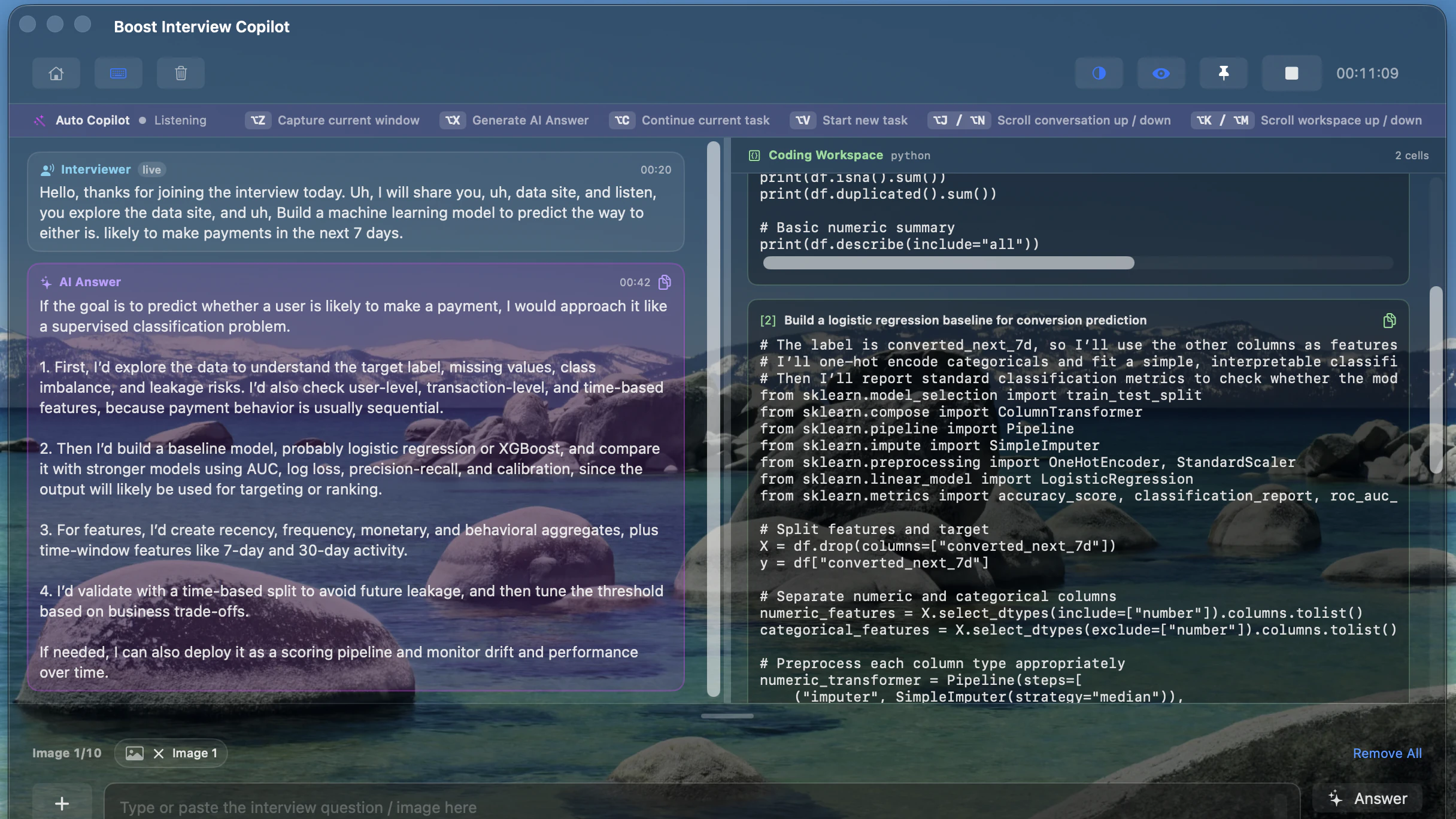
- Generate an AI answer in the left panel based on the current interview question or screenshots.
- ⌥C — Continue Current Task
- Continue the current task using relevant code context from that task’s workspace. Earlier code may be summarized; previous screenshots and all earlier reasoning are not kept as a complete archive. The generated solution is appended to the coding workspace on the right.
- ⌥V — Start New Task
- Start a completely new question using the latest screenshots. Previous task context will not be reused. This mode is suitable for problems like LeetCode where each screenshot usually represents a new question. The answer will be generated in the coding workspace on the right.
- ⌥J / ⌥N — Scroll Conversation
- Scroll through the conversation history in the left panel. When you do not manually scroll, the conversation automatically follows the latest content. After scrolling manually, it stays at your selected position. To return to automatic following, scroll back to the bottom.
- ⌥K / ⌥M — Scroll Workspace
- Manually scroll the coding workspace on the right panel. The workspace does not automatically follow the bottom; scrolling is fully controlled by you.
All interviews except Coding Interview
In Behavioral, Technical, System Design, General, and Phone Interview, select a question or other text in a supported app, then press ⌥X, just as in Coding Interview. A successfully read selection becomes the current Input Question, and Copilot answers it directly if it is a question, or explains it otherwise. This answer is a plain spoken answer, not generated code.
For example, select the relevant transcription in Copilot’s left panel, then press ⌥X to get an answer based on that text.
Allow Accessibility access when macOS asks to read a selection from another app. If a selection is not picked up, copy it and paste it into Input Question before pressing ⌥X. You can also type a question directly into Input Question without selecting any text, then press ⌥X or click the Answer button.
- ⌥Z — Capture Current Window
- Capture the currently focused window and attach it to the current problem.
- ⌥X — Generate AI Answer
- Generate an AI answer from the selected text, the current question, or screenshots.
Problem-solving workspace
Coding Interview
Coding Interview keeps the conversation on the left and a dedicated coding workspace on the right.
Continue the same task
Press ⌥C when the interviewer adds a requirement, asks for an optimisation, or wants you to extend the current solution. Relevant code context from the current task is reused; earlier code may be summarized. For example, continue one data science project through data preprocessing, feature engineering, model training, and evaluation.
Move to a new problem
Capture the latest problem, then press ⌥V. Copilot starts a separate task and does not reuse the previous problem’s context. For example, move from Two Sum to a separate Binary Tree question on LeetCode.
A practical workflow
- Focus the active window containing the question, such as LeetCode, HackerRank, VS Code, or a Jupyter Notebook in Chrome, then press ⌥Z to capture it. Press repeatedly to capture different parts of the question; screenshots accumulate in Input Question, up to 10 images per question.
- With an empty coding workspace, press ⌥C or ⌥V to generate the first solution. Both start the first task when there is no previous code context.
- Use ⌥C for follow-ups that belong to the same problem. Use ⌥V when you begin a new, independent problem so the previous problem’s code context is not reused.
- Use ⌥J / ⌥N to scroll up and down through the conversation in the left panel, and ⌥K / ⌥M to scroll up and down through the coding workspace in the right panel.
When you do not manually scroll, the conversation automatically follows the latest content. After scrolling manually, it stays at your selected position. To return to automatic following, scroll back to the bottom.
The workspace does not automatically follow the bottom; scrolling is fully controlled by you.
Translation is not available in Coding Interview. Answers intended for the coding task continue in the right workspace, while Answer with ⌥X writes to the left panel.
Practice before the call
Mock Interview & Feedback
Mock Interview is a voice practice session tailored to your selected resume, Target Role, and interview type.
Mock Interview
- Select a resume, Target Role, and one of the available voice interview types: System Design, Technical, Behavioral, or General.
- Listen to the interviewer’s question and answer aloud. After you begin answering, about 7 seconds without detected speech automatically submits your answer and requests the next question or follow-up. To move on sooner, select Finish Answer once your answer text appears while listening. This pause is measured after your speech, not after the interviewer finishes asking the question.
Each Mock Interview can last up to 1 hour. Free accounts have three Mock Interviews in total, each limited to 10 minutes. See Free Trial, Plans & Usage for session and inactivity limits.
Feedback
- Select End Interview when you are ready. The session and both speakers’ transcript are saved in History. If Settings → Interview Report Generation is enabled, a report evaluates the complete Mock conversation. This is the same report setting used by live Copilot and is on by default.
- Open History to review the transcript and, when a report is generated, its overall score, strengths, improvement areas, five scoring dimensions, and question-by-question feedback with stronger answer examples. Turning report generation off does not prevent the session or transcript from being saved.
Know what is included
Free Trial, Plans & Usage
Free
Try the complete workflow
- 15 total minutes of Real-time Interview Copilot, measured by actual use and shared across sessions. No credit card required.
- One trial per account and device. Switching accounts or reinstalling the App does not provide another trial.
- The same account may continue its remaining allowance on another eligible Mac; changing devices never creates another 15 minutes.
- 3 Mock Interviews in total, each with its own 10-minute limit. Feedback is included when report generation is enabled.
- In the website’s Interview Questions library, preview up to the first 20 questions in each search or filter result. All question-library filters remain available.
- Store 1 resume and 3 Target Roles. Extra Context requires a paid plan.
- 25 MB total uploaded-document storage; each file can be up to 5 MB.
Paid
More room for an active search
- Unlimited total Copilot time while your paid plan is active, with no fixed limit on the number of Mock Interviews. Each live Copilot session is limited to 2 hours and each Mock Interview to 1 hour; the inactivity rules below also apply.
- Stay signed in on up to two Macs. Only one interview may be active at a time; you can end the other session before continuing.
- Access the complete Interview Questions library.
- Store up to 10 resumes, 30 Target Roles, and 10 Extra Context files.
- 150 MB total uploaded-document storage; each file can be up to 5 MB.
How limits work
Your 15 free Copilot minutes are one shared allowance, not 15 minutes per session. For example, one ten-minute session and one five-minute session use the full allowance and appear as two separate History records. When report generation is enabled and completes successfully, the report is attached to its own session.
For Free accounts, Mock Interview uses a separate allowance: three sessions in total, and every session starts with a new 10-minute timer. Paid accounts are not subject to these free limits; each paid Mock Interview can last up to 1 hour. Mock time never uses or reduces your Live Copilot minutes. Available Mock sessions can still receive reports when report generation is enabled, even after your free Copilot minutes are used up.
When free usage is exhausted or paid access ends, you cannot start newly restricted sessions or use paid features. Your existing History, transcripts, and generated reports stay available. Deleting an uploaded document releases its storage space.
Inactivity and session limits — all plans
These session rules apply to both Free Trial and Paid accounts, across all interview types. Free Trial allowances and the free Mock Interview 10-minute limit still apply and may end a session sooner. The first limit reached ends the session.
After 15 minutes without speech, Copilot asks whether your interview is still active. Coding Interview allows 30 minutes of silence. Choose Keep Interview Running or End Interview. If there is still no speech or response for another 5 minutes, the interview ends automatically. Speech during the reminder cancels the inactivity countdown.
Live Copilot sessions have a 2-hour maximum; Mock Interviews have a 1-hour maximum. These caps apply regardless of plan or language, with free allowances potentially ending a session earlier. A reminder appears 10 minutes before the maximum. At the limit, the interview ends automatically: audio connections close, your transcript and any coding workspace are saved, and the session appears in History. For both Copilot and Mock Interview, feedback is requested only if Interview Report Generation is enabled. You can start a new session afterward if your plan or remaining allowance permits.
Set up safely
Permissions, Privacy & Troubleshooting
Microphone
Required to caption your side of the conversation and to answer a Mock Interview aloud.
Screen & System Audio Recording
Required to hear audio playing on your Mac and to capture the focused window. Copilot does not save video from system-audio capture.
Camera
Not required for current Copilot or Mock Interview workflows. You can leave camera access disabled.
Depending on the recognition mode used for your session, macOS may also request Speech Recognition permission. Allow it if prompted.
If captions or capture do not work
- Open System Settings → Privacy & Security and confirm Boost Interview is enabled for the required permission.
- Quit and reopen Boost Interview after changing Screen & System Audio Recording access.
- Confirm the correct microphone is available and play a short test before the interview.
- If ⌥Z captures the wrong content, focus the window you want first (not the Boost Interview Copilot window itself), then press the shortcut again.
Your audio and interview data
Ending a session stops audio capture and live audio connections. This also applies when a time limit ends it automatically: up to 2 hours for live Copilot or 1 hour for Mock Interview, with free allowances potentially ending it sooner.
Your Voice Profile stays on this Mac. The original voice sample used to set it up is processed in memory and is not saved as an audio recording.
Under our Privacy Policy, we do not use your private interview content to train AI models without your explicit consent. See the Privacy Policy for data uses, cloud processing, retention, and service-provider terms.
Transcripts and generated reports are saved to your account so you can review them in History. You can delete a session from History when you no longer want to keep it. Always follow the recording and consent rules that apply to your interview.